Array Flatten in JavaScript

Introduction
In JavaScript, Array Flattening is the process of taking a nested array (an array that contains other arrays) and "unwrapping" those inner arrays into a single, flat list of elements.
Think of it like unpacking a delivery:
you might have a large box containing several smaller boxes, each with items inside. Flattening is the act of taking every individual item out of those smaller boxes and laying them all out on the floor together.
This article will help you deeply understand nested arrays and how to flatten them step-by-step like in real interviews.
What Are Nested Arrays?
A nested array is essentially an "array within an array." In JavaScript, since an array can hold any type of data including other arrays you can build complex, multi-layered structures to organize information.
Let's think of it like a filing cabinet:
The cabinet is the main array, the drawers are nested arrays, and the folders inside those drawers are yet another level of nesting.
Example:
Single Array: [1, 2, 3];
Double Array: [[1, 2], [3, 4]];
Deeply Nested: [1, [2, [3, [4]]]]
Here:
Outer array → main container
Inner arrays → arrays inside the main array
Real-world analogy:
A playlist with folders of songs.
A shopping cart with bundles of items.
A folder system in your computer.
Why Flattening Arrays As Useful
Flattening arrays might seem like an extra step, but it is a fundamental part of data normalization. It is the process of converting a multi dimensional array into a single dimensional array containing all the elements.
It takes complex, hierarchical data and transforms it into a predictable, linear format that is easier for both the computer and the developer to handle.
1. Simplifying Data Processing
Most JavaScript array methods like .map(), .filter(), and .reduce()are designed to operate on a linear sequence. When your data is nested, these methods become cumbersome because you have to write loops within loops.
First let's understand the problem: Nested Data
Imagine you have a grocery list organized by category. If you want to find items that start with the letter "B", you would normally need a loop inside a loop.
code:
const groceryCategories = [
  ["Apples", "Bananas"],
  ["Bread", "Butter"],
  ["Carrots"]
];

// WITHOUT FLATTENING:
// You have to map/filter through the outer array AND the inner arrays.
const results = groceryCategories.map(category =>
  category.filter(item => item.startsWith("B"))
);

console.log(results); // [["Bananas"], ["Bread", "Butter"], []] - But Still nested!
But here is the solution: Flattening First
By using .flat(), you turn the "array of arrays" into one simple list. Now, you only need to run your logic once.
code:
const groceryCategories = [
  ["Apples", "Bananas"],
  ["Bread", "Butter"],
  ["Carrots"]
];

// WITH FLATTENING:
const flatResults = groceryCategories.flat()
// 1. Convert to ["Apples", "Bananas", "Bread", "Butter", "Carrots"]

  .filter(item => item.startsWith("B"));
// 2. One simple check for the whole list

console.log(flatResults);
// Output: ["Bananas", "Bread", "Butter"]
2 . Improving Search and Filtering
If you are building a search bar, searching through a flat array is significantly faster and easier to code than recursively searching through deep branches of data.
Let's Understand with Example
Imagine you have a list of categories, and each category has sub-items.
code:
const categories = [["Apples", "Bananas"], ["Carrots", "Spinach"], ["Bread"]];

// Hard to search "Spinach" here without nested loops.
// After .flat():
const flatList = ["Apples", "Bananas", "Carrots", "Spinach", "Bread"];
const found = flatList.includes("Spinach");
// Easy Right!
3 . Mathematical Operations
Calculating sums or averages is straightforward once the nesting is removed.
Means, when you have nested data, calculating a simple sum usually requires recursive functions or multiple nested reduce calls. Flattening creates a linear data structure, which is the ideal state for mathematical aggregation.
Example:
const nestedSales = [[100, 200], [50], [300, 100]];

const total = nestedSales.flat().reduce((acc, curr) => acc + curr, 0);
// Result: 750
Concept of Flattening Arrays
As we know what flattering an array does but in simple terms, it involves taking an array that contains other arrays and "unpacking" them until all elements are on a single level.
Think of it's like a set of nested boxes. Each box represents an array. Flattening is the act of taking every item out of every inner box and laying them out in a single straight line.
1 . Shallow Flattening
This only removes one level of nesting. If you have an array inside an array inside an array, only the first layer is "broken open."
2 . Deep Flattening
Deep Flattening This continues the process indefinitely until there are no arrays left inside the structure. In modern JavaScript, this is easily handled by the flat() method with an Infinity argument.
Example:
const deeplyNested = [1, [2, [3, [4]]]];

const flat = deeplyNested.flat(Infinity);
// Result: [1, 2, 3, 4]
Different Approaches to Flatten Arrays
When it's comes to flattening arrays, the best approach entirely depend on your use case like how much depth of nesting you are dealing with..
Then it's explore together,
1 . The Modern Built-in: Array.flat()
This is introduced in ES2019 and that time it's most readable and standard way to handle nesting.
Example:
const nested = [1, [2, [3, [4]]]];

// Flatten 1 level (default)
console.log(nested.flat()); // Output [1, 2, [3, [4]]]

// Flatten all levels
console.log(nested.flat(Infinity)); //Output [1, 2, 3, 4]
But here why we used Infinity,
Because passing Infinity as the argument will flatten every single level regardless of nesting depth.
And It's also have it's own pros and cons
so, let see
Pros:
Clean & readable
Built-in method
Cons:
- Interviewers may ask you to implement manually to see you know the concept or not so be prepare.
2. The Recursive Approach
This is the classic logic used in computer science to handle hierarchical data. It uses the "Divide and Conquer" strategy.
Let just think,
You iterate through the array. If you hit an element that is also an array, you call the function on itself to "dig deeper." If it’s a primitive value, you add it to your results.
Example:
function flattenArray(arr) {
  let result = [];

  for (let item of arr) {
    if (Array.isArray(item)) {
      result = result.concat(flattenArray(item));
    } else {
      result.push(item);
    }
  }

  return result;
}

console.log(flattenArray([1, [2, [3, 4]], 5]));
// Output [1, 2, 3, 4, 5]
How it's work
Let's break down step by step to understand..
what happens when you run flattenArray([1, [2, [3, 4]], 5]) :
1 . The Initial Call
The function starts looping through the top-level elements: 1, [2, [3, 4]], and 5.
Element:
1*Array.isArray(1)is false.Action: It is pushed directly to result.
Current result:
[1]
2 . The First Recursive Leap
Element:
[2, [3, 4]]Array.isArrayis true.Action: The function pauses its current work and calls
flattenArray([2, [3, 4]])to "unpack" this sub array.
3 . Deep Dive (Inside the sub-array)
Now we are inside the second layer.
- Sub element:
2
-- Action: Pushed to this local result.
-- Current local result: [2]
- Sub-element:
[3, 4]
-- Array.isArray is true again!
-- Action: Another recursive call: flattenArray([3, 4]).
-- This third call loops through 3 and 4, finds they aren't arrays, and returns [3, 4].
4 . Bubbling Back Up
--The second layer receives [3, 4] and concatenates it with its own [2].
--> Layer 2 result becomes: [2, 3, 4]
-- The top-level layer receives [2, 3, 4] and concatenates it with its original [1].
-->Main result becomes: [1, 2, 3, 4]
5 . Finishing the Loop
- Element:
5
-- Action: Pushed to the main result.
-- Final Result: [1, 2, 3, 4, 5]
But it's also have it's own pros and cons,
Pros: Works on any depth.
Cons: Very deep nesting (thousands of levels) can cause a Stack Overflow because each call takes up memory.
Common Interview Scenarios
When an interviewer asks you to flatten an array, they aren't just looking for code; they are testing your problem-solving thinking:
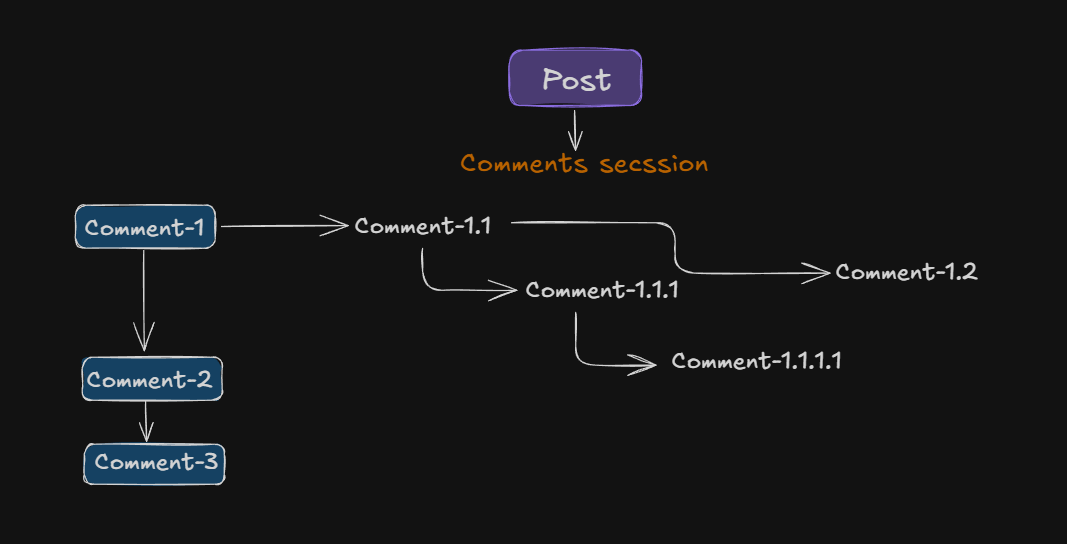
1 . Nested Comments System (Very Common)
Think of YouTube or Reddit comments.
Each comment can have replies → and replies can have more replies.
const comments = [
  {
    id: 1,
    text: "Chai-Backend Video!",
    replies: [
      {
        id: 2,
        text: "Thanks, Hitesh Sir!",
        replies: [
          { id: 3, text: "Acche se pdhai karo!" }
        ]
      }
    ]
  }
];
Goal:
-> Convert this nested structure into a flat list of comments.
Output:
["Chai-Backend Video!", "Thanks, Hitesh sir!", "Acche se pdhai karo!"]
Interview Thinking
Each comment contains replies array
Replies contain same structure again
This is recursion + flattening.
Solution code:
function flattenComments(comments) {
  let result = [];

  for (let comment of comments) {
    result.push(comment.text);
    if (comment.replies) {
      result = result.concat(flattenComments(comment.replies));
    }
  }

  return result;
}
2 . File System / Folder Traversal
This is the most classic interview problem.
Example:
const folder = {
  name: "root",
  files: ["a.txt"],
  subfolders: [
    {
      name: "images",
      files: ["img1.png"],
      subfolders: []
    }
  ]
};
Goal:
-> To get all file names from every folder.
Output:
["a.txt", "img1.png"]
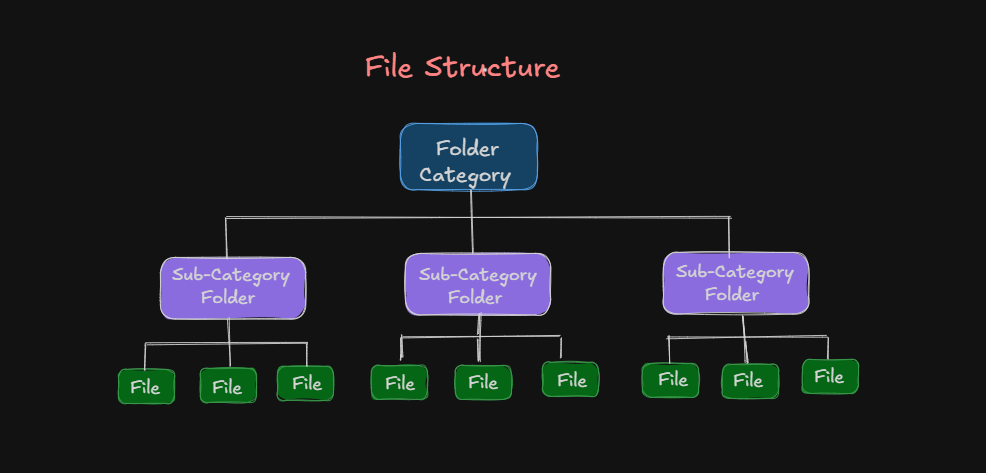
Why Interviewers Love This
It tests:
Recursion
Tree traversal
Flattening nested data
Solution code:
function getAllFiles(folder) {
  let files = [...folder.files];

  for (let sub of folder.subfolders) {
    files = files.concat(getAllFiles(sub));
  }

  return files;
}
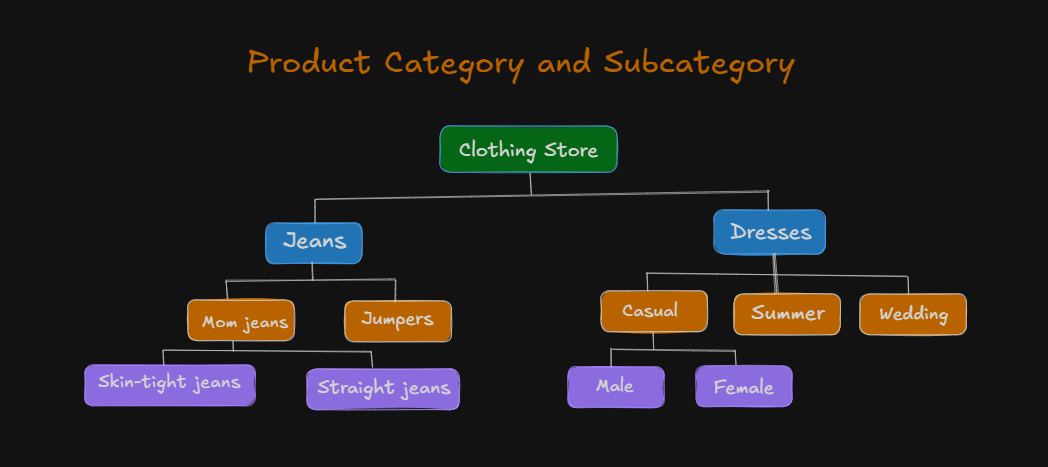
3 . Category Tree (E-commerce)
Amazon-style category hierarchy.
Example:
const categories = [
  {
    name: "Electronics",
    children: [
      { name: "Phones", children: [] },
      {
        name: "Laptops",
        children: [{ name: "Gaming", children: [] }]
      }
    ]
  }
];
Goal:
-> Return all category names in one list.
Output:
["Electronics", "Phones", "Laptops", "Gaming"]
4 . Flatten Mixed Depth Array (Classic Coding Round)
This is the direct version of the problem.
Example:
const arr = [1, [2], [3, [4, [5]]]];
Output:
[1, 2, 3, 4, 5]
Conclusion
Array flattening in JavaScript converts nested arrays into a single level array, simplifying data handling and normalization.
Modern JavaScript offers Array.prototype.flat(depth) for straightforward flattening, while recursion or reduce + concat remain useful for compatibility.
Choose the method based on required depth, performance constraints.
With these patterns you can reliably normalize complex data, write cleaner code, and make informed choices across real world applications.


