Learn Emmet Abbreviation
Introduction
We all are developers typing code everyday, But have you ever face the thinking process of our mind doesn’t catch up with our typing speed unless you type so fast. But What if i tell you there was a way to write lines of HTML in seconds, with just a few keystrokes? Yeah, exactly what Emmet does, and it's a game-changer for anyone who writing code, especially beginners.
History of Emmet
So, the developer’s developed Emmet to speed up developers typing of HTML, XML, and CSS workflows by allow them to type CSS-like expressions that are generated into full code, also noted in the documentation.
The project Emmet was known as Zen Coding and it was created by Russian software developer Sergey Chikuyonok. which was started in 2008 and later evolved and was renamed to Emmet in 2012.
What is a Emmet
Emmet is a free and open-source toolkit that’s like a magical tool for developers. It’s a collection of plugins for various text editors that lets you write HTML, CSS, JS, and other structured code formats at lightning speed using shortcuts. Think of it as a superpower for Writing code .
At its core, Emmet is really just a series of keyboard shortcuts.
And it is preinstall in Visual studio Code (VSC) Editor.
Why Emmet is useful for HTML beginners
If you forgot to close tag , don’t worry Emmet automatically closes your tag
It save your time of finding where you close tag or not .
It’s time saving you don’t have to spend your time on those angle brackets.
The emmet provides hole syntax ,so we can focus on content on the webpage.
For beginners they always make mistake while writing code, some time they forgot to close tag or add brackets, semicolon so because of emment it helps them to write better code.
How Does Emmet Work Its Magic?
Let’s talk about Emmet in VS Code editor
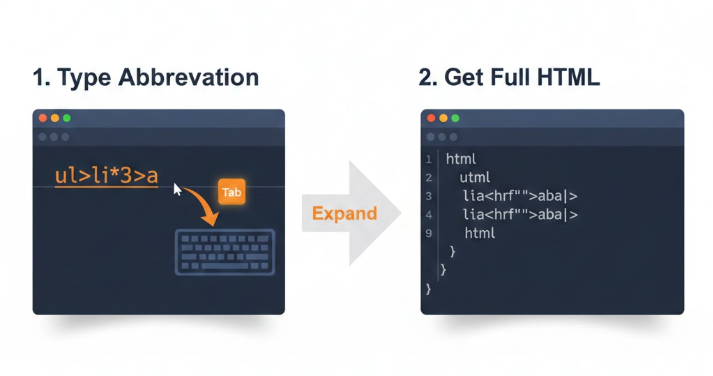
You type the abbreviation (like ul>li*3>a)
You press the tab key or just say enter.
You editor gives you the complete HTML code
Emmet : Type Less, Code More
The Emmet syntax and abbreviations
Let's start with the absolute basics.
HTML (Boilerplate Code):
Just by typing exclamation mark ( ! ) You can generate hole HTML boilerplate code.
Code:
!
Output:
<!DOCTYPE html>
<html lang="en">
<head>
    <meta charset="UTF-8">
    <meta name="viewport" content="width=device-width, initial-scale=1.0">
    <title>Document</title>
</head>
<body>

</body>
</html>
Child Elements
(>)
A child element is any element that is nested inside another element.
Code:
div>p
Output:
 <div>
        <p></p>
    </div>
Sibling Elements
(+)
While a child element lives inside another, a sibling element lives right next to another element, sharing the same parent.
Code:
h1+p
Output:
<h1></h1>
    <P></P>
Multiplication
(*)
A multiplication is used when you need to create the same element multiple times in a row.
Code:
ul>li*3
Output:
<ul>
        <li></li>
        <li></li>
        <li></li>
    </ul>
Class
(.)Attribute
The class attribute is used to group elements together so you can style them all at once with CSS.
Code:
div.section
Output:
<div class="section"></div>
ID
(#)Attribute
The ID attribute is used to give a unique name to a single, specific element on your page.
Code:
div#main
Output:
<div id="main"></div>
Nested Elements
The nesting is the act of placing one element inside another. This creates a "parent-child" relationship that defines the structure of your webpage.
Code:
ul>li>a
Output:
<ul>
    <li><a href=""></a></li>
</ul>
Conclusion
Emmet is a powerful tool for developers, especially beginners, as it significantly speeds up the process of writing HTML, XML, and CSS code. By using simple abbreviations and shortcuts, developers can generate complex code structures quickly and efficiently.
Emmet's ability to automatically close tags and provide complete syntax helps reduce errors and allows developers to focus more on the content of their webpages.


